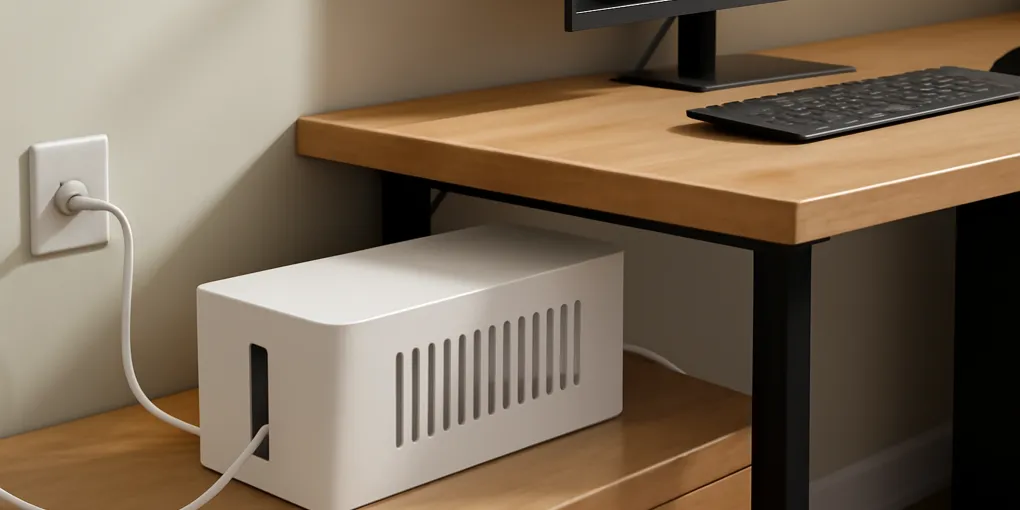
Best Cable Management Boxes for Home Office Desks: Hide Cords Without Trapping Heat
Buyer's GuideVentilated desktop cable box
Best for visible desksBest For: Power strip clutter on or beside a writing desk
$18-35
Quick picks
| Product | Key Specs |
|---|---|
| See price on Amazon |
|
| See price on Amazon |
|
| See price on Amazon |
|
Product availability, certifications, and retailer details can change; check the current Amazon page before buying.
A cable box can make a home office look calmer, but it can also hide a bad power setup. The useful version contains a right-sized power strip, gives cords gentle exits, keeps the floor path clear, and does not trap warm adapters under a lid. The wrong version is a decorative coffin for a crowded strip, two laptop bricks, a lamp plug, and a charger block that already runs hot.
This guide is for desks, writing tables, and small apartment work zones. If your cord problem is in an entryway, start with our entryway charging station protocol instead; the risks are different when phones, keys, and bags all land in the same drop zone.
Quick picks
- Visible desk or side table: Search Amazon for ventilated cable management box desk
- Floor cord cleanup: Search Amazon for under desk metal cable tray
- Loose cord routing: Search Amazon for adhesive cord clips cable sleeve desk
- Sit-stand desk add-on: Search Amazon for clamp on under desk cable tray
Choose the organizer by failure point
Start by naming the actual failure. If the power strip is on the floor where feet, chair wheels, pets, or a vacuum hit it, an under-desk tray is usually better than a box. If the strip sits on top of a desk because the wall outlet is far away, a ventilated box may be enough. If the strip is fine but cables snake across the writing surface, clips and sleeves solve more than a large container.
The Electrical Safety Foundation International warns against overloading extension cords and using cords in ways that create heat, damage, or trip hazards. A cable-management product should reduce those problems. It should not encourage daisy-chaining, hiding damaged cords, or stuffing a power strip under fabric.
A desktop cable box is best for a modest strip with phone chargers, a lamp, and one small power brick. Look for long side slots, a raised interior, and enough height for plugs to sit naturally. A box that barely closes is too small. If the lid presses on plugs, cords will bend sharply and the strip may become harder to inspect.
Measure before buying
Measure four things: power strip length, tallest plug, widest power brick, and the direction cords need to exit. Many boxes advertise exterior length, but the inside can be shorter because of rounded ends or lid supports. Add at least two inches beyond the strip so plugs do not crowd the end wall.
Height matters more than people expect. A flat phone charger is easy. A laptop brick, monitor adapter, or smart-home hub plug can make the lid useless. If a power brick already feels warm during normal use, do not bury it under a closed lid. Move that adapter to open air, use an under-desk tray with airflow, or simplify the setup.
Cord exits should match the desk layout. A good box has openings on both short ends and sometimes the long side. For a wall-facing desk, rear exits matter. For a side table, end exits are usually cleaner. If every cable must squeeze through one slot, the box will twist or pull every time the desk moves.
Cable box, tray, or sleeve?
| Setup | Better choice | Reason |
|---|---|---|
| Power strip sits beside a desk leg | Ventilated cable box | Contains visible clutter while keeping access nearby |
| Power strip lies under chair wheels | Under-desk metal tray | Gets the strip off the floor and shortens dangling loops |
| Sit-stand desk has monitor and dock cords | Clamp or screw-on tray | Moves with the desktop and reduces cord tugging |
| Keyboard and charger leads cross the work surface | Clips and sleeves | Routes light cords without hiding the power source |
| Thick adapters run warm | Open tray or rearranged outlet use | Avoids heat buildup inside a closed box |
A cable box is not automatically safer than visible cords. Its value is containment plus inspection. You should still be able to lift the lid, see the strip, and unplug something quickly. If the box makes the strip harder to reach, the setup may be less practical during a power issue.
Safety and heat checks
Do not put a cable box under a rug, behind a pile of paper, or inside a closed cabinet without airflow. Do not use it to hide damaged insulation, loose plugs, or a strip that trips often. If a cord gets pinched under the lid, stop and reroute. Cable organization should reduce friction and strain.
For laptop-heavy desks, separate high-draw bricks from small chargers. A laptop brick can sit on the desk-side edge, on an open tray, or in free air while the lower-heat phone and lamp plugs sit in the box. If you need more outlets, buy the correct power strip for the load instead of adding splitters inside the box.
Trip risk is part of the buying decision. The CDC’s fall-prevention guidance focuses on keeping pathways clear. A cable box that stays under the desk but leaves a loop across the walking path has not solved the problem. Route the cord along a wall or desk leg and secure slack away from feet.
Desk-specific buying notes
For small writing desks, choose the smallest box that fits the strip with breathing room. Oversized boxes steal surface area and become paper trays. For gaming or monitor-heavy desks, skip the pretty desktop box and use a metal under-desk tray with cable ties; the number of bricks and display cords usually overwhelms a small box.
For renters, adhesive clips are useful but not permanent. Clean the surface first, avoid dusty particleboard, and use clips only for light cords. Heavy power strips need screws, clamps, or a stable tray. If a product relies on adhesive to hold a loaded strip upside down, read the weight rating carefully.
For sit-stand desks, check the full travel path before mounting anything. Raise and lower the desk while watching the power cord, monitor cables, dock cable, and lamp cord. Leave a service loop that moves without pulling. The neatest cable sleeve is a failure if it yanks the wall plug at standing height.
Room-by-room placement notes
For a bedroom desk, keep the power switch reachable from the chair or bed side rather than buried behind a nightstand. Phone chargers, lamp cords, and humidifier cords often share the same area, so the cable box should not become a general appliance bin. If a humidifier or fan needs power, keep its cord path separate from low-voltage laptop and phone cables.
For a living-room work corner, choose a box that is easy to open for guests and cleaning. A box beside a sofa can collect pet hair and paper scraps, so vents should be visible and the interior should be inspected during normal vacuuming. If pets chew cords, containment helps only when the cord exits are also protected and the main run is not dangling at floor level.
For a child’s homework desk, use the organizer to simplify rather than hide complexity. One lamp, one computer charger, and one spare USB charger are easier to supervise than a hidden strip full of adapters. Keep any power strip instructions and ratings accessible to the adult who maintains the desk.
What not to buy
Avoid boxes with no visible vents or only a tiny decorative slot. Avoid boxes that force all cords through one sharp-edged hole. Avoid fabric cord bags around power strips; fabric hides heat and makes inspection harder. Avoid bargain under-desk trays with rough unfinished edges that can scrape cable jackets.
Do not buy a box solely because it matches the desk. The best-looking box can still be wrong if it is too short for the strip or too low for the plugs. Product photos often show slim USB chargers, not the bulky adapters used by monitors, routers, and laptop docks.
Skip magnetic or adhesive-only solutions for heavy strips unless the manufacturer clearly supports the loaded weight and surface type. A falling strip can pull plugs, scare pets, or leave cords stretched across a walkway.
Setup protocol
- Unplug the desk setup and discard damaged cords.
- Measure the power strip, largest plug, and available clearance.
- Decide whether the strip belongs on the desk, under the desk, or along a wall.
- Place warm adapters in open air or in a ventilated tray.
- Route the main power cord along a wall or desk leg, not through the walking path.
- Bundle only the slack, not the section that needs to move.
- Label chargers only when several identical cords share the box.
- Recheck after one workday for heat, lid pressure, and chair-wheel contact.
Cable management box FAQ
Can I close a cable box over laptop chargers?
Only if the charger fits without pressure and does not run warm in use. Many laptop bricks are better left on an open tray or beside the box with airflow.
Should a power strip be mounted under a desk?
It can be a good solution when the strip is secured, accessible, and not overloaded. Use hardware that matches the desk material and check that plugs do not pull when the desk moves.
How do I keep a cable box from becoming another clutter bin?
Keep only the power strip and active chargers inside. Do not store spare cables, paper, adapters, or receipts in the box because they make inspection harder and crowd the cords.
Sources
Frequently Asked Questions
- They can be safe when the box is ventilated, the strip fits without crowding, cords exit without sharp bends, and high-heat adapters are not buried.
- Measure the power strip, largest plug, and cord bend radius, then choose a box with extra length, height, ventilation, and separate exits.
- An under-desk tray is better when the goal is clearing the floor. A box is better when the strip must remain accessible near a wall or side table.