How to Set Up a Charging Drawer Without Creating a Fire-Risk Tangle
ProtocolQuick picks
| Product | Key Specs |
|---|---|
| See price on Amazon |
|
| See price on Amazon |
|
| See price on Amazon |
|
Product availability, certifications, and retailer details can change; check the current Amazon page before buying.
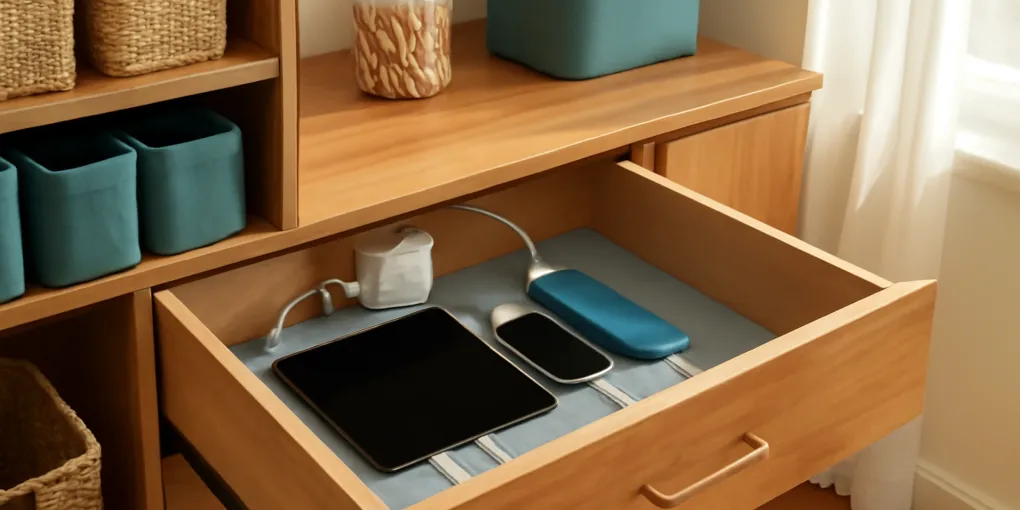
A charging drawer sounds tidy: close the drawer and the cables disappear. The risk is that the same drawer can also hide heat, damaged cords, overloaded adapters, and devices buried under paper. The goal is not to make charging invisible. If the problem is a desk cord nest rather than a shared household charging spot, start with our explainer on why cord nests form behind desks. The goal is to make it organized while keeping cords inspectable and devices cool.
Use this protocol if you want one household charging spot for phones, earbuds, tablets, kids’ devices, flashlights, or rechargeable batteries. If the drawer cannot stay clean and ventilated, choose an open charging station instead.
Quick product path
- USB-C charging station with spaced ports: Search Amazon for USB C charging station
- Cable clips for drawer routing: Search Amazon for adhesive cable clips
- Short braided charging cables: Search Amazon for short USB C charging cables
- Open countertop charging dock: Search Amazon for countertop charging dock
First decision: drawer, shelf, or open dock?
| Charging setup | Best for | Skip it when |
|---|---|---|
| Charging drawer | Occasional devices, clean drawer, nearby outlet | Drawer collects paper, cords pinch, devices run warm |
| Open countertop dock | Phones and tablets used daily | You need to hide everything from view |
| Wall shelf with cable clips | Entryway or kitchen command center | Outlet location forces cords across a walkway |
| Under-desk tray | Home office devices | Kids need frequent access |
If you check devices several times a day, a drawer adds friction. If you want a landing zone for rarely moved devices, it can work.
Charging drawer setup protocol
- Empty the drawer completely. Remove pens, receipts, batteries, paper, and fabric.
- Inspect every cable. Discard cords with exposed wire, sharp bends, heat marks, loose connectors, or intermittent charging.
- Choose one charging hub rather than a loose pile of wall bricks. Use equipment from reputable brands and follow the device manufacturer’s charger guidance.
- Route the power cord through a clean rear or side opening. Do not pinch it under the drawer track.
- Add cable clips so each cable has a fixed path and enough slack to reach the device.
- Use short cables when possible. Long cable nests create snags and hide damage.
- Keep devices separated. Phones, tablets, and battery packs should not be stacked while charging.
- Leave air space around adapters and devices. If the drawer feels warm, stop using it as a closed charging station.
- Label cables by device or connector type so household members stop pulling the whole bundle.
- Check the setup monthly for dust, heat, loose plugs, and broken insulation.
Ventilation and heat checks
The most important test is boring: after the first full charging session, open the drawer and touch near the adapters and devices. Warm can be normal. Hot, trapped, or plasticky-smelling is not. Unplug the setup and change the design.
Electrical Safety Foundation International guidance warns against damaged cords, overloaded outlets, and cord misuse. Those same principles apply inside a drawer. A hidden cable is still a cable. A closed drawer should not turn into insulation around chargers.
Do not charge lithium-ion devices under paper, clothing, or mail. NFPA lithium-ion battery guidance highlights the importance of using compatible chargers, avoiding damaged batteries, and noticing overheating warning signs. Keep charging devices visible enough that swelling, odor, heat, or damage is noticed early.
What belongs in the drawer
Good candidates:
- Spare earbuds that charge occasionally.
- A small tablet that sits flat with air around it.
- Rechargeable flashlights with intact manufacturer chargers.
- Labeled cables for household phones.
- A single charging hub mounted or placed where it cannot slide.
Poor candidates:
- High-watt laptop bricks.
- Loose rechargeable batteries without proper chargers.
- Power tools or e-bike batteries.
- Devices with swollen batteries or damaged ports.
- Any charger that already runs hot in open air.
Cord routing details that matter
A charging drawer usually fails at the back edge. The power cord gets crushed by the drawer slide, kinked around a sharp corner, or stretched every time someone opens the drawer. Use a smooth cord pass-through or choose a different location. Do not cut furniture in a way that exposes rough edges without a grommet or protective sleeve.
Inside the drawer, keep cable slack controlled with clips, not tight zip ties. You want enough movement to plug in a phone without pulling the hub, but not enough slack to form knots. If several family members use the drawer, color-coded short cables are easier than tiny labels.
Safer alternatives
If the drawer cannot stay empty except for charging gear, switch to an open dock. A countertop charging station gives better airflow and faster inspection. A wall-mounted shelf can work near an entry outlet if cords do not cross a walking path. A simple tray with labeled cable clips may be safer than a drawer because the mess stays visible.
For home offices, an under-desk cable tray plus desktop cable clips is often better. It keeps the power strip accessible and keeps daily-use cables where you can reach them.
Charging drawer FAQ
Can I close the drawer while devices charge?
Only if the drawer stays cool, cords are not pinched, and the charger/device manufacturer does not require open-air placement. If heat builds up, leave it open or move charging elsewhere.
Can a power strip go inside a drawer?
Avoid loose power strips in drawers unless the product and installation are designed for that use. A sliding drawer can stress cords and hide overload problems.
How often should I inspect charging cords?
Monthly is reasonable for a household charging station, and immediately after any cord is slammed, chewed, bent, or starts charging intermittently.
Sources
- Electrical Safety Foundation International: Home Electrical Safety
- NFPA: Lithium-ion battery safety
- American Red Cross: Prevent home fires
Frequently Asked Questions
- It can be safe only if chargers have ventilation, cords are not pinched, devices do not overheat, and the setup follows manufacturer and electrical-safety guidance. A closed crowded drawer is a poor charging station.
- Do not put damaged cords, swollen batteries, loose power strips, high-heat adapters, or devices buried under paper, fabric, or junk inside a drawer.
- A ventilated countertop dock, wall-mounted charging shelf, or open cable tray is better when devices charge daily or need heat inspection.