Quick picks
Under-Desk Cable Tray
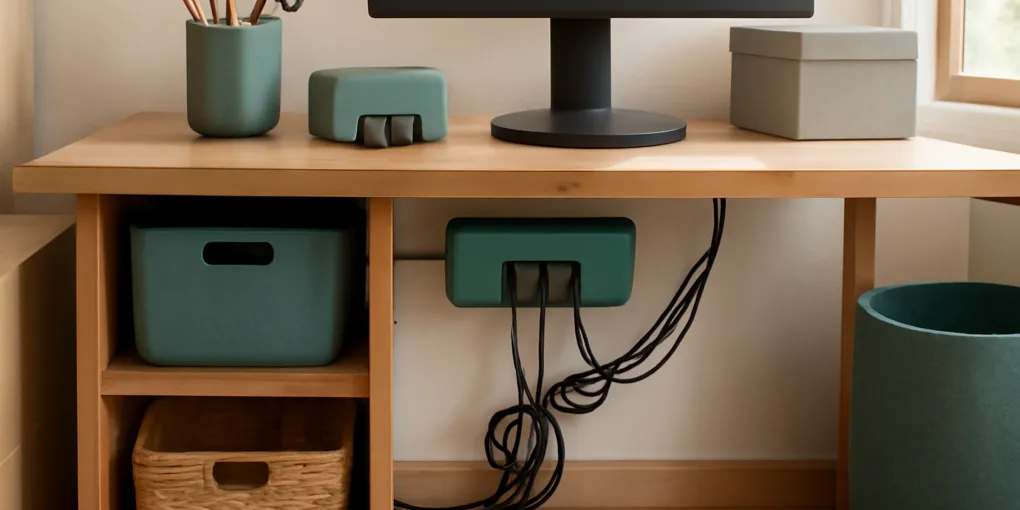
★ Top pick Best first fix- Best For: Power strips, monitor bricks, docks, and floor-level cable slack
- Caveat: Needs desk underside clearance and careful mounting
Reusable Hook-and-Loop Cable Ties
Best slack control- Best For: Shortening loops and keeping device changes reversible
- Caveat: Can damage thin cords if overtightened
Cord nests behind desks are not a character flaw. They are what happens when long flexible objects, gravity, chair movement, cleaning friction, and small device changes all point in the same direction. The first tidy-up looks good because the cords are temporarily arranged. The nest comes back because the system still lets cable slack drift toward the floor.
If your desk also has a visible power strip, compare this approach with our Yamazaki Tower cable box review. A cable box can hide a floor-level strip; a tray-and-tie system is better when the real problem is drift under a fixed workstation.
Quick picks for stopping cable drift
- Main cable support: Search Amazon for under-desk cable trays. Use one when a power strip, monitor bricks, dock adapters, and slack loops are sitting on the floor.
- Slack control: Search Amazon for reusable hook-and-loop cable ties. Use ties to shorten cable loops, separate daily cables from fixed cables, and make future changes reversible.
Measure the underside of the desk, the power strip length, adapter height, and screw clearance before buying a tray. For ties, choose a width that will not crush thin charging cables and leave enough space to add a small label.
The short answer
Cord nests form because cables are usually installed with too much slack and too little support. The extra length drops behind the desk, then gets pushed by feet, chair wheels, vacuum hoses, pets, and repeated plug changes. Each small movement is harmless on its own. Over weeks, the slack migrates into one low point, and the low point becomes a knot.
A good cable system lifts the power strip and adapters off the floor, gives each cable a controlled slack loop, and keeps changeable cables separate from fixed infrastructure. Most failed desk setups do only the cosmetic job: they shove the whole bundle out of sight.
The mechanism: cable drift
Cable drift is the slow movement of slack toward the path with the least resistance. Behind a desk, that path is usually downward, backward, and toward the nearest tangle.
Four forces create the nest. Gravity pulls unsupported loops below the desk. Friction from chair wheels, shoes, storage bins, and cleaning tools tugs cables a few centimeters at a time. Device churn adds one more monitor, dock, charger, webcam, or lamp without removing the old routing pattern. Ambiguity keeps unlabeled cords in place because nobody wants to unplug the wrong thing.
The result is a ratchet effect. Cables move toward disorder more easily than they move back toward order. Once several cords cross, the bundle becomes harder to edit, so people avoid it until the nest interferes with cleaning, plugs, or concentration.
Why this matters for ergonomics and attention
A cord nest is partly an electrical and cleaning problem, but it is also an ergonomic problem. OSHA computer workstation guidance emphasizes arranging the workstation so frequently used items and input devices can be reached without awkward strain. Cables that catch on chair wheels, pull at a dock, or force you to crawl under a desk are small but repeated sources of friction.
NIOSH describes ergonomics as fitting the job and workspace to the worker. In a home office, cable routing is part of that fit. If the power brick sits where your feet should rest, or the charging cable forces you to twist under the desk twice a week, the setup is not neutral.
There is also an attention cost. Visual attention research shows that irrelevant objects can compete with task-relevant information. Cable nests are high-contrast visual noise: black lines, loops, plugs, adapters, dust, and shadows.
Fit checks that matter
A cable fix is worth trying when it moves cords off the floor, keeps plugs reachable, reduces visual loops behind the desk, and still leaves every adapter easy to inspect.
| Fit check | What to verify |
|---|---|
| Fit and safety | Ergonomics and attention research support reducing reach friction, visual interference, and unmanaged workstation hazards. |
| Verifiable details | The mechanism is grounded in established ergonomics and visual-attention principles, though direct trials of home cable trays are limited. |
| Value and capacity | A tray plus reusable ties is inexpensive relative to replacing damaged cables, docks, or power strips. |
| Daily friction | The fix matches common home-office failure modes: floor power strips, rolling chairs, dust, and changing devices. |
| Listing clarity | The system does not claim to make unsafe wiring safe; it still requires inspection, load limits, and damaged-cord removal. |
The intervention is strongest for fixed desks with monitors, docks, lamps, speakers, and chargers. It is weaker for temporary work tables where equipment moves daily.
The two-zone fix
Do not try to make every cable invisible. Separate the desk into fixed and active zones. The fixed zone includes the power strip, monitor power, dock power, speakers, printer cable, lamp, and any cable that rarely moves. These should live in or near an under-desk tray, with only the necessary length dropping to the outlet or device.
The active zone includes a laptop charger, phone charger, headphones, camera cable, or anything you unplug often. These should have reachable parking spots, not be tied into the fixed bundle. This distinction prevents the common failure where one daily charging cable gets pulled and drags the entire hidden bundle with it.
How to install a low-drift desk setup
First, unplug and identify everything. Remove cables for devices you no longer use. Do not keep a mystery cable in the main bundle just because it might matter later; label it and store it separately if you are not ready to discard it.
Second, mount or place the cable tray where plugs can enter without sharp bends. The tray should support the power strip and heavier adapters, not force them into a crowded stack. Follow the tray and power-strip instructions, and do not exceed electrical ratings.
Third, route each fixed cable with one gentle service loop. A service loop is enough slack to move the device slightly without pulling the plug, but not enough slack to fall to the floor. Tie that loop with a reusable hook-and-loop strap.
Fourth, label both ends of the cables that are hard to identify: monitor, dock, lamp, printer, speakers. Labels reduce the fear of unplugging the wrong device, which is one reason old cords stay in the nest.
Safety and maintenance checks
Cable management should make inspection easier, not hide problems. During setup, look for cracked insulation, warm adapters, bent plugs, overloaded strips, and cords pinched under furniture. Replace damaged cords instead of tying them neatly. Avoid running cords where chair wheels repeatedly roll over them.
Once a month, push loose slack back into the tray, retighten hook-and-loop ties, remove chargers that migrated into the fixed zone, vacuum dust without yanking the bundle, and check that adapters have air space. The goal is not a perfect photo; it is a setup that resists drift after real use.
Sources
- OSHA. Computer Workstations eTool: https://www.osha.gov/etools/computer-workstations.
- CDC/NIOSH. Ergonomics and Musculoskeletal Disorders: https://www.cdc.gov/niosh/ergonomics/about/index.html.
- McMains, S. A., and Kastner, S. (2011). Interactions of top-down and bottom-up mechanisms in human visual cortex: https://pubmed.ncbi.nlm.nih.gov/21228167/.
- Rosenholtz, R., Li, Y., and Nakano, L. Measuring visual clutter. Journal of Vision, PubMed record: https://pubmed.ncbi.nlm.nih.gov/18085946/.
Frequently Asked Questions
- The first tidy-up usually changes appearance, not forces. If extra cable length still hangs below the desk, gravity and small tugs pull it back into the lowest point.
- For a fixed workstation, usually yes. A tray lifts the power strip and adapters off the floor; a cable box is better when the strip must stay visible or floor-level.
- They are useful when loose enough to hold a loop without crushing the cable or forcing a sharp bend. Avoid overtightening thin charging cords.
- Do a quick monthly reset and a deeper reset whenever you add or remove a monitor, dock, lamp, printer, or charger.